> For the complete documentation index, see [llms.txt](https://roid-classic.gitbook.io/roid-documentation/llms.txt). Markdown versions of documentation pages are available by appending `.md` to page URLs; this page is available as [Markdown](https://roid-classic.gitbook.io/roid-documentation/key-features/vendor-system.md).
# Vendor System
### Vendor Policy
Vending are allowed only in this Cities:
* Payon
* Morocc
* Alberta
### Find a store
There are several ways to find and buy items.
Use @ws2 command
You can use an item name or item ID to find sellers.
**Example:** `@ws2 Gold` or `@ws2 969`
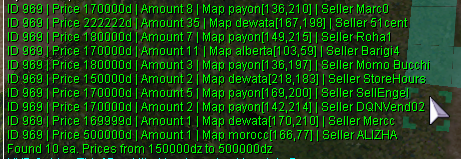
Next, head to the merchant's location and execute the `/navi` command.
**Example:** I decided to buy gold from Pedro's seller, so I'm entering his coordinates into the command: `/navi payon 136/210`
#### Use Merchants List page on website[¶](https://wiki.uaro.net/site/Vendor_System/#use-merchants-list-page-on-website)
You can visit the [Merchants List Page](https://uaro.net/cp/?module=merchant\&action=vendors), log in, and search for items.
#### Use #trade channel in-game[¶](https://wiki.uaro.net/site/Vendor_System/#use-trade-channel-in-game)
In the game, you can write in the `#trade` channel what you need to buy or see if someone is already selling it. You might say `B> Gold` and list an amount and price.

#### Use Discord[¶](https://wiki.uaro.net/site/Vendor_System/#use-discord)
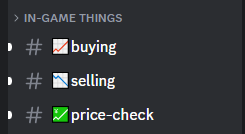
Our Discord server has a [#selling](https://discord.com/channels/702960460168953946/1198723464526319706) channel where you can search if someone is already selling what you want to buy. You can also post in [#buying](https://discord.com/channels/702960460168953946/1198723441872863272) to request it.
### Find a buying store[¶](https://wiki.uaro.net/site/Vendor_System/#find-a-buying-store)
There are several ways to sell items to other players.
#### Use @wb2 command[¶](https://wiki.uaro.net/site/Vendor_System/#use-wb2-command)
You can use an item name or item ID to find buyers.
**Example:** `@wb2 Gold` or `@wb2 969`

#### Use trade channel[¶](https://wiki.uaro.net/site/Vendor_System/#use-trade-channel)
In the game, you can write in the `#trade` channel what you need to sell. You might say `S> Gold` and list an amount and price.

#### Use Discord[¶](https://wiki.uaro.net/site/Vendor_System/#use-discord_1)
Our Discord server has a [#buying](https://discord.com/channels/702960460168953946/1198723441872863272) channel where you can search for buyers, or post directly in the [#selling](https://discord.com/channels/702960460168953946/1198723464526319706) channel.

### Create a buying store[¶](https://wiki.uaro.net/site/Vendor_System/#create-a-buying-store)
Any class can create a buying store. Here are the main requirements for creating a store:
* **Possession of the item**: You must possess the item you wish to purchase.
* **Allowed items**: Only "Etc" items and non-brewed consumables can be purchased via a buying store. "Equips" and brewed consumables cannot be purchased this way.
* **Sufficient zeny**: You must have enough zeny to cover the cost of the desired items.
* **Weight capacity**: Your weight capacity must be sufficient to accommodate the purchased items.
* **Designated location**: The buying store must be placed in an authorized location.
Buying stores are created differently depending on your character class:
#### For Non-Merchant Classes:[¶](https://wiki.uaro.net/site/Vendor_System/#for-non-merchant-classes)
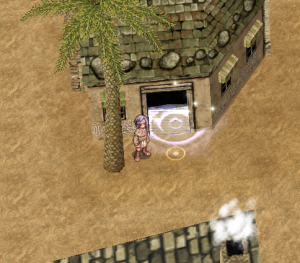
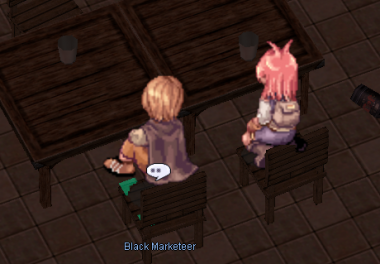
1. Head to **Morroc Pub** and find the **Black Marketeer** (`/navi morocc 45/108`).
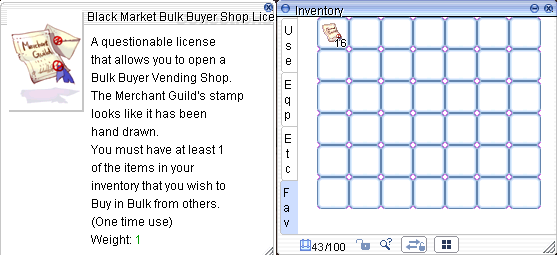
2. Purchase **Black Market Bulk Buyer Shop License** for 500z each (up to 10 at a time).
3. Navigate to a designated vending spot and use the license item from your consumables tab. You can now set up your shop.
#### For Merchant Classes:[¶](https://wiki.uaro.net/site/Vendor_System/#for-merchant-classes)
* Visit the **Merchant Guild** in Alberta (`/navi alberta 35/42`).
* Talk to the **Purchasing Team NPC**.
* Pay 10,000z to unlock the "**Open Buying Store**" skill, which allows you to open permanent buying shops. You'll also receive 5 free **Bulk Buyer Shop Licenses**.
* Purchase additional licenses for 200z each (up to 50 at a time).
* Licenses are required to use the skill.
* You must have learned the Vending skill to at least level 1.
Note
Autotrading merchants are allowed while playing on another account.